Pages

VBA Mail Merge RTF Email using Excel and Outlook

This article describes a solution on how to use Excel to send rich text format emails that are customized for their recipients.  Some of us may find it difficult to use VBA for Outlook to format rich text in the body of an email.  The approach taken here bypasses this difficulty by creating a draft rich text format email template using Outlook's user interface instead of creating it programmatically.

Let's start with an Excel spreadsheet which looks like the following figure.  There are three fields which will be used to customize each email.  Of course, the most important field is the email address itself which will be used to determine the recipient.


Next, we suppose that the following email template have been created and saved in the Drafts folder of Outlook.  The Subject: must be called "Template" because this is the string which the macro will lookfor.


Notice the placeholders {name} and {number}.  These placeholders will be replaced by the actual values drawn from each record in the spreadsheet illustrated earlier.

Here's the coding part.  Let start by defining a macro to load the email template from the Drafts folder in Outlook.  Basically, this macro iterates each item in the Drafts folder to find the template which is the one with its subject as "Template".  Line 11 is the trick to get the job done.  The formatted template is retrieved and is returned from this function hence eliminating the need to code the body of the email programmatically.

Private Function GetRichTextTemplate() As String

    Dim OLF As Outlook.MAPIFolder
    Dim olMailItem As Outlook.MailItem
    
    Set OLF = GetObject("", "Outlook.Application").GetNamespace("MAPI").GetDefaultFolder(olFolderDrafts)
    Set oItems = OLF.Items
    
    For Each Mailobject In oItems
        If Mailobject.subject = "Template" Then
            GetRichTextTemplate = Mailobject.HTMLBody
            Exit Function
        End If
    Next
 
End Function

Next, we need to define the macro SendMailMergeEmail to generate the customized emails and to send them out.  There are a few things this macro do.  First, it uses the GetRichTextTemplate macro to get the template from the Drafts folder.  Then for each record in the spreadsheet, it will retrieve the values and place them into the placeholders.  And then, it will put in the subject and the recipient before sending out the email.

Public Sub SendMailMergeEmail()
    Dim OLF As Outlook.MAPIFolder
    Dim olMailItem As Outlook.MailItem
    Dim olContact As Outlook.Recipient
    Set OLF = GetObject("", "Outlook.Application").GetNamespace("MAPI").GetDefaultFolder(olFolderInbox)
    
    Dim subject As String
    subject = " Latest Product Update"
    
    Dim body As String
    Dim template As String
    template = GetRichTextTemplate()
    
    Dim cnumber As String
    Dim cname As String
    Dim email As String
    
    Dim row As Integer
    row = 2

    cnumber = Sheets("Main").Range("A" & row)
    cname = Sheets("Main").Range("B" & row)
    email = Sheets("Main").Range("C" & row)
    While cnumber <> ""
        Set olMailItem = OLF.Items.Add
        With olMailItem
            Set olContact = .Recipients.Add(email)
            olContact.Resolve
            
            .subject = subject
            .BodyFormat = olFormatRichText

            body = Replace(template, "{name}", cname)
            body = Replace(body, "{number}", cnumber)
            .HTMLBody = body
            
            .Send    
        End With

        row = row + 1
        cnumber = Sheets("Main").Range("A" & row)
        cname = Sheets("Main").Range("B" & row)
        email = Sheets("Main").Range("C" & row)
    Wend
    
    Set olContact = Nothing
    Set olMailItem = Nothing
    Set OLF = Nothing
End Sub

One more thing.  For the codes above to run, the reference for Microsoft Outlook 14.0 Object Library has to be set.  If you are not using the latest Office 2010, you could select Microsoft Outlook Object 12.0 Library for Office 2007.


The above dialog box can be accessed from the Excel VBA Window under Tools...References.  After adding the reference, you are now ready to execute the macro SendMailMergeEmail to send customised rich text emails.  Here is a sample of the generated email that was sent.


You can see that the number, customer name and email have been mail-merged into the template.  By the way, you can find all sent emails in the Outlook's Sent Items folder.

The codes have been tested using Excel and Outlook 2010.  You can download the Excel File here.  Hope you have enjoyed this post and find the example useful.

Ally Bank's Advertisements

The remarkable thing about these advertisements is the use of a kid's innocence to get a message across powerfully in a revolutionary way. Watch closely the expressions of these kids. See their surprise, unbelief, frustration, protest and resentment. Enjoy. Remember to poll for your favourite Ally's advertisement in the right panel on the side bar.


Google Maps in China

This is my first post in this blog using Google Maps. Also to highlight in China, to be more precise in Beijing, there is a offset of 265 meters between the map and satellite views.


To see the actual difference, click on the Map view and the Satellite view.

Sudoku Game implemented in Java


Project Euler, Python and Notepad++

I have taken an interest in Project Euler lately. This project presents a series of challenging mathematical or computer programming problems that will require more than just mathematical insights to solve. Although mathematics will help you arrive at elegant and efficient methods, the use of a computer and programming skills will be required to solve most problems.

The next thing for me to consider was what is the programming language to use. I thought of C# initially but soon change my mind because it is too heavy weight. I decide to use something light weight and dynamic. With a desire to learn something new, I have made Python to be my choice.

Lately I have also upgraded my Notepad++ to 5.8.5. After the update, I looked at what are the latest plugins I could add on. I have found the Python Script plugin. To my delight, Python was also installed together with this plugin in my Notepad++ folder. So I got Python for free.

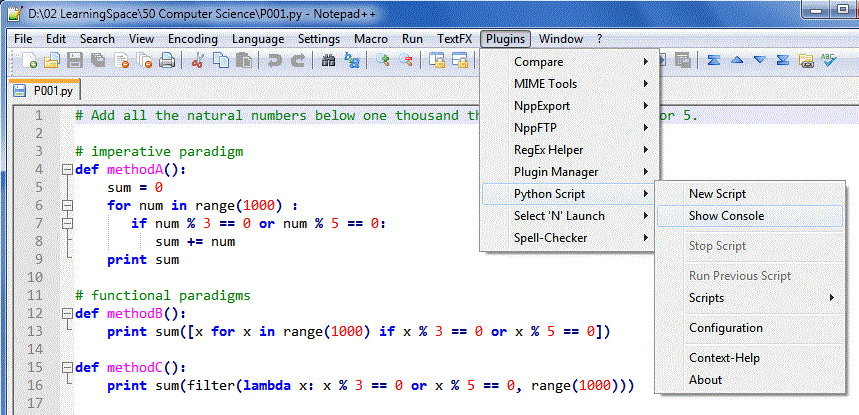
Next I have to figure out how to use this plugin. Actually, this plugin is not for general Python application development, it is more for Notepad++ automation using Python scripting. First and foremost, the Python Console is very important. To open the Python Console, click [Plugins], [Python Script] and [Show Console] as illustrated.


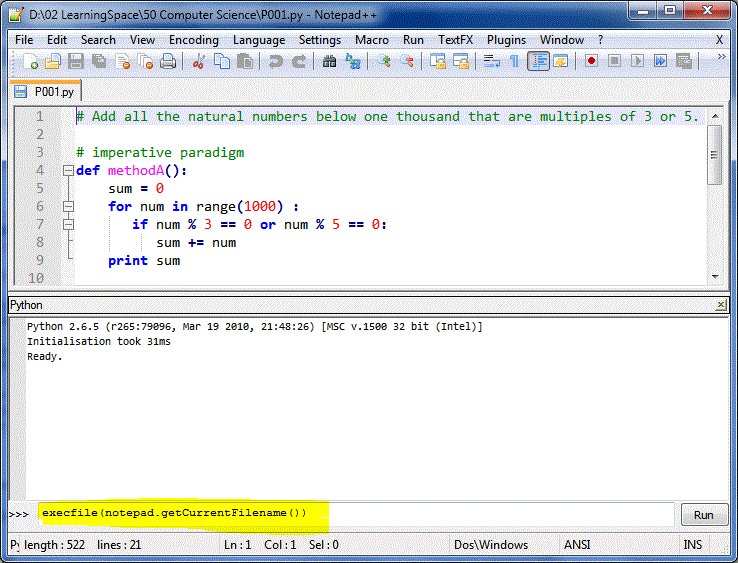
You can see from the above screen shot that it was Python 2.6.5. There are quite a few methods to run a Python script from the [Run] menu but what I am going to present here is a different method, running the script within the Python Console.

The Python Script plugin for Notepad++ comes with a few objects defined. One of them is the notepad object. The method getCurrentFilename() returns the full path name of the file being edited. Hence, we can use the command execfile() with notepad.getCurrentFilename() to accomplish what we want. In summary, enter the following command.
execfile(notepad.getCurrentFilename())

You only need to key in the command once. After this, you use the [Up Arrow] key to retrieve the previous command for execution.

The following is three solutions which I have come up for Problem 1.
# Add all the natural numbers below one thousand that are multiples of 3 or 5.

# imperative paradigm
def methodA():
    sum = 0
    for num in range(1000) :
       if num % 3 == 0 or num % 5 == 0:
          sum += num
    print sum

# pythonistic 
def methodB():
    print sum([x for x in range(1000) if x % 3 == 0 or x % 5 == 0])

# functional paradigm
def methodC():
    print sum(filter(lambda x: x % 3 == 0 or x % 5 == 0, range(1000)))
 
print "This is Project Euler Problem 1" 
methodA()
methodB()
methodC()

Bubble, Selection & Insertion Sorts Demonstration

// Bubble Sort
for (int outer = a.length - 1; outer > 0; outer--) {
   for (int inner = 0; inner < outer; inner++) {
      if (a[inner] > a[inner + 1]) { 
         int temp = a[inner + 1];
         a[inner + 1] = a[inner];
         a[inner] = temp;
      }
   }
}
// Selection Sort
for (int outer = a.length - 1; outer > 0; outer--) {
   int max = outer;
   for (int inner = 0; inner < outer; inner++) {
      if (a[inner] > a[max]) {
         max = inner;
      }
   }
   int temp = a[outer];
   a[outer] = a[max];
   a[max] = temp;
}
// Insertion Sort
for (int outer = 1; outer < a.length; outer++) {
   int temp = a[outer];
   int inner = outer;
   while ((inner > 0) && a[inner - 1] > temp) {
      a[inner] = a[inner - 1];
      inner--;
   }
   a[inner] = temp;
}

A Dive Into Hangzhou - Part 2

The original tour plan was DIY. However, we were enticed by a 1-day package that the travel agency at Friendship Hotel was offering at RMB175 that covered a number of attractions. Oh well, we convinced ourselves, we've been travelling around freestyle for a number of days and are starting to get worn out. So how about a break and let others take care of the logistics, drive us around and give a running commentary to boot? 8am to 5pm sounded like a very efficient schedule with all transport and admission taken care of -- we were sold on this proposition.

Because of the early start time of the tour, we had a rather rushed breakfast at the revolving restaurant on top of the Friendship Hotel. Nothing much was lost by way of the West Lake view, though, as it turned out to be an especially misty morning. "Thick mist over water" is the summary. The hearty and healthy breakfast spread made us happy. Then it's off to the day's adventure in Hangzhou!

First stop of the itinerary was the east shore of West Lake where the tourist boat was waiting to take us to the largest island in the lake. The jetty is near one of the top scenic/vantage areas around West Lake, called Orioles Singing in the Willows (柳浪聞鶯). King Qian, a good king to the people and filial son to his mother, reputedly planted the willows and brought in orioles for his mother to enjoy. Well, they are still there for the world's enjoyment today.


The boat quickly brought us to one of the islands on the lake, from which we viewed the famous 3 Pools Mirroring the Moon (三潭印月). If you have a RMB1 note, you can see this on its back. The guide said that once a year, at full moon in the 8th month of the lunar calendar, visitors can see 32 "moons" at this spot. How? There are 3 stone lantern-like structures rising from the lake. Each has 5 round windows through which candlelight shines out. When these lantern-like structures are lit once a year at Mid-Autumn, their windows glow, making 3 x 5 = 15 "moons". Their reflection in the lake adds 15 more "moons" to the count. Finally, the real (full) moon in the sky and its reflection in the lake caps the count at 32! How fascinating. Visitors crowd the lake annually to catch this sight.


Another ferry conveyed our group to the next destination on the east shore -- the Yue Fei Mausoleum. This is the burial place of the Southern Song dynasty general famed for his loyalty to his country. The well known Chinese song "Man Jiang Hong" was composed by him in captivity. Ironically, it was not the enemy who landed him in prison. Corrupt court officials and emperor Gaozong, whom he served, were responsible for the wicked deed. He died a prisoner, falsely accused of treason, in his own country. Centuries later, people still throng his mausoleum in admiration of a dynasty's hero. Tour guides still tell the story of national governance gone very wrong. But visitors are now discouraged from spitting on the iron statues of his betrayers kneeling across his tomb.

The coach took us around some other tourist spots in Hangzhou, with the predictable mix of commerce with strident promotions of Hangzhou silk and West Lake green tea. It was said that the cheongsams worn by the lady presenters at the Beijing Olympics were Hangzhou silk and Suzhou embroidery. And Hangzhou West Lake Dragon's Well green tea is reputedly one of the very highest grade of tea in China.


We ended a long day with dinner at a local restaurant near the lake. The concept is quite novel. We pay for food tickets first at a counter near the entrance and use these to make food and beverage purchases from different counters inside the restaurant. Any remaining food tickets can be exchanged for cash back at the exit. We tried a local dish, Cat's Ears. No, it was not some exotic meat dish. On the contrary, it was a tame soupy dish with flour bits shaped like tiny cat's ears (well they were small triangles with a dose of imagination) that actually tasted quite good in the cold weather.

After dinner, it was a short trot to the musical fountain at West Lake -- gracefully choreographed water jets with lights and music earned the awws of appreciation from visitors. In that relaxed mood, getting sprayed with water was fun for many standing there.

For us, we were happy to see Friendship Hotel towering beyond the edge of the lake where the musical fountain was. This meant that we were near a warm shower and comfortable bed, all of 20 minutes walk across a few streets. We could have been faster, but my Reeboks gave up (they were eventually left behind in Shanghai). The day's packed schedule was the final straw, I guess. Along the way back, we saw a handicapped man writing very beautiful calligraphy on the sidewalk in chalk. Glad he had some donations. But it is indeed hard for him to earn his keep this way, in the dust of road traffic. We have seen many sides of Hangzhou today.

A Dive Into Hangzhou

Hangzhou of the West Lake fame, we were finally here. This is also the part of the journey that we especially look forward to because of the nice Friendship Hotel with good online reviews. It took some effort dragging ourselves from our hotel room once we checked in, but out we go...

We were two hungry and cold people trawling the streets around our hotel for dinner. We saw some interesting things, like this typical small stall selling hot fried snacks (see pic), which the locals were buying. Interesting because it was Taiwan snacks sold in Hangzhou. Too tired to be adventurous, we settled for MacDonalds and were pleasantly surprised that the fish and beef in Hangzhou taste better than that back home.

A must-do, budget permitting, for visitors to Hangzhou is to catch the Impression: West Lake show which literally takes place over the West Lake. This we faithfully did on our first night, braving the cold. How thoughtful, the show organisers even rented out down jackets for RMB10 each. And even allocate the red ones for ladies and black ones for gentlemen. Coming from Zhang Yimou the critically acclaimed Chinese director (who did the opening and closing ceremonies of the Beijing Olympics 2008), the show is, unsurprisingly, spectacular. It's an understatement, I know. But you just have to be there to see it. The online clips can't give the whole experience of sitting open air at the edge of the West Lake, feeling the breeze, watching the light, sound and water play together on a natural stage as the actors do their thing.


What marred the show, through no fault of the show people, was a significant number of tourists who, seized with an inexplicable fear of being left behind by their tour group, started standing up and walking out in the last 5 minutes of the show. This, of course, blocked the view of the remaining weirdos who actually wanted to finish the show. This fear of being left behind mentality is quite chronic. We saw it in commuters at subway stations too. You know, those who somehow manage to barricade the entire exit for the alighting passengers and believe in different physical laws that if you block people from getting off a crowded train, you can still squeeze yourself into the train?

But back to the main story, we had an enjoyable, albeit freezing, evening at the lake and were very happy to find a cab in those rather remote parts. Looking forward to tomorrow!

A Dip Into Suzhou

We arrived in Suzhou just past 1pm and have less than 24 hours in the city.

The first direct encounter with Suzhou took place at the railway station, where lots of transport touts, map-sellers and beggars did their thing. We were glad that the "authorised" taxi queue moved fast and reached the hotel fairly quickly.

The Humble Administrator's Garden was our main destination this time round, and even the 1 1/2 hours we had before closing time was barely enough for us walk through the expansive grounds properly. The ticket price included an official guide who took us through the main sections of the garden by way of introduction. Thankfully, at least we had the guide's assistance to better appreciate the place, its history, design and interesting tidbits. A pity about the short time we had -- before coming I'd envisaged sitting around at various vantage points in the garden to contemplate the pictures of nature as its previous owners did. We'd need about 3 hours to get into that kind of contemplative mood!


Then it was a quick trishaw ride to Guan Qian Jie, the main pedestrian walking street in Suzhou where Starbucks and Haagen Dazs share the street with 100-year old stores. An evening bonus came in the form of a crepe outlet, from which I got a strawberry and banana crepe. Somehow, all the people buying crepes were girls!? After walking quite a while without getting a cab, we were very happy to board the right bus and stop at the right stop a stone's throw from our hotel.

There, our quick dip into Suzhou, and we're bussing out tomorrow.

First Date with Nanjing

When we arrived on Sunday night, it was cold and rainy. By the time we boarded the train to Suzhou on Wednesday, it was a fond farewell to Nanjing.

Since I've missed a few days, i'll be short on words and put in some pix to tell the tale :-)

First cold rainy night, we cabbed it to the Confucius Temple area, which has come a long (touristy) way from being an educational institution imparting Confucian teachings. The presence of many locals as well as tourist groups led by tour guides with loudhailers at that time of day confirmed that this is a "night" attraction. Interestingly, the cinema there was showing "Confucius" the movie starring Hong Kong star Chow Yun Fatt.


Monday morning was much better weather-wise. We finally saw the sun and made our way to the Purple Mountain. This was the last week of the International Plum Blossom Festival 2010. It's a breath of fresh air getting to highland away from the polluted city. However, a guide said that the plum blossom blooms were not as great this year; it rained the first two weeks of the month-long festival. And I thought the blossoms were wonderful already! At the Purple Mountain, one should also see the Ming Tomb of the first emperor of that dynasty and its Sacred Way (lined with stone statues of civil and warrior officials and various animals). This was the pioneer that influenced the layout of later Ming and Qing tombs found outside Beijing. We spent half a day there and barely visited half the attractions on Purple Mountain; one can imagine why the locals enjoy a leisurely summer day retreat to these environs.

After much exercise on Monday, we sought some muscular reprieve at the Presidential Palace in Nanjing city on Tuesday. The sunny weather bolstered our spirits after the wet welcome to this ancient capital to six dynasties a few days earlier. The Presidential Palace is a place for history lovers. It has been occupied by at least six noteworthy personages in their generation, all the way from Prince Han of the Ming dynasty, through to Sun Yat Sen, through to Chiang Kai Shek. Sun Yat Sen is held in very high esteem here, seeing as he is the "Father of modern China". There was a nice, educational exhibition dedicated to telling his story, with photos, English captions and some artefacts. There was more to see and savour slowly, but we had to rush through the sprawling grounds towards our next destination of the day.


Next after modern China history was a hark to the more distant past -- Zhonghua Gate of the Ming dynasty. This is a huge gate set within the southern city walls, the largest of its kind in China. In fact, during the first Ming emperor's reign, these city walls were the most extensive in the world. There are interesting details on the design and function of the gateways, citadels and portcullises. Were we seriously expecting muscular reprieve with this? I thought the hike up to the Ming Tomb the day before was the most strenuous on this trip. But the climb up the ramp to the top of the wall was another workout. I wonder about the horses who had to carry generals in full armour up the steep incline; they must be very strong animals!

Something New and Something Old in Shanghai

Finally, we are here again. Not before a red eye flight that merits an endurance medal, but we have finally landed in Shanghai. And made it through the metro without losing any of the three pieces of luggage despite jostling with commuters out on a Saturday morning. And reasoned in vain with the hotel reception why we should be charged only what the agent-issued travel voucher said, and not more, for turning up early. But, we are glad.


Amazingly, despite our sleep deprivation and general fatigue on the first day, we managed to sample a taste of the old and new at two unique Shanghai spots. (Well, not so amazingly, we ended the day with cup noodles in the hotel room because we were too tired and cold!)

The first is a restaurant called the Red House at Central HuaiHai Road, in the heart of the French Concession Red House Restaurant. Featured in a travel-cum-food programme on Singapore TV recently, my interest was piqued that the writer Eileen Chang and the opera singer Mei Lan Fang were associated with this historical eatery. It is literally red on the outside, and sits along a what-i-can-imagine-to-be-lovely-leafy-boulevard-once-the-green-returns-and-the-grey-sky-turns-blue. But today, it is cold and windy, and the bare branches look somewhat forlorn. The Red House, too, has seen better days. There seems to be a certain dignity in accepting that it wasn't what it used to be and bravely adapt as best as it can. It banks on nostalgia now. And there is a market for it, so it seems.


There was a steady stream of patrons flowing in all the time we were there. Perhaps they liked the service, as we did. Or the ambience, as we also did. And of course the food, it beat any Western food we had eaten in Singapore in the same price range. If we could drift into satisfied slumber there and then, we would (well, almost did) -- but TaiKang Road beckons...


There is still a working wet market at TaiKang Road in the French Concession. Neighbour to a flourishing art district. There are people buying and selling fresh meat, seasonal vegetables, artsy photographs and curious sculptures in one locality. The art district itself is a maze of alleys, where converted traditional residential houses showcase artistic talent. Some turns actually lead you to the backdoor to real homes, laundry and all. It was quite amazing that a cluster of old, weathered houses has been revived into a thriving and throbbing centre of activity. Tellingly, both locals and tourists descend on this charming spot; friends meet for tea, shop for gifts, shutterbugs point and shoot; tourists get a bite of history and then a drink of beer. Even getting lost in the labyrinth can be delightful.

But then the wind chill bitterly reminded us how underdressed we wear, and it was time to head back to the hotel for shelter. Did I mention that the camera acted up like a cold car engine? Hope the weather gets warmer. Take care!

What is in a Name?

It was a spark of inspiration to try my hand at literal translation in Beijing in April 2009.


We were trying to get from Point A to Point B by foot, seeing as it was the most direct route compared to taking the underground. So there's this short straight section of road (multiplied by a few times for a few turns) which should bring us happily to dinner at a modern shopping mall. However, as with most things in China, don't forget the scale of things! 2 centimeters on a map work out to a lot more steps and sweat in a sprawling metropolis like Beijing. Not that we didn't know, having trod through the Temple of Heaven grounds the day before, but here we are, too far gone to turn back to Point A, but still a long and hungry distance from Point B. But I digress...

In the turn of a corner, we were at 正义道. All at once, we were greeted by a pretty promenade under an intricate canopy of almost bare branches. After all, spring has yet time to coax the life and colours out of these graceful trees. We were informed that this was a park. That's nice, and hey, isn't that a modern toilet smack in the centre? Solar powered, no less, and in spiffy silver. Strangely enough, without the space age looking toilet, the park would have reminded me of a similar promenade in Boston, MA, reclaimed from marshland.


That hunch was a hint to the history of the area. The guidebook tells us that this was formerly an embassy strip. Looking at this building, you'd probably expect it to be in some Western country, well, not China in any case. But here it is, next to a futuristic looking public toilet, on 正义道 in Beijing. I realise what an accurate snapshot that was of Beijing now in all its transition and transformation, but that's not the point of this blog today :-)


正义道 literally means path of righteousness. Besides sounding a happy resonance of Psalm 23:3, it evoked some irony for an area that housed diplomats of a bygone era, all jostling for a foothold in the Middle Kingdom. Today, the place is a quiet park, a convenient connector between two main roads. Quaint statues dot the promenade. Here a sweeper girl, there a musician. Quite a different flavour from earlier times, but still, no less, 正义道.


I haven't told you about 望京, the City of Hope yet! The usual tourist wouldn't detour here, but this is a pleasant northeastern suburb with a sizeable Korean community and modern amenities. My Korean friends have no problems getting ingredients from home here, the City of Hope.

Beijing Cherry Blossom Festival 2009

A little heart wish was fulfilled recently at YuYuanTan Park in Beijing.

To set eyes on transient beauty, lay hold of fleeting spring, feel time brush langorously past as lithe willows sway, enjoy the translucent canopy of paper thin blooms overhead... flitting, flying, falling so perfectly, none out of place.

This is the Cherry Blossom Festival 2009 in Beijing. Weeks of anticipation turned into overwhelmed sight and a gentle heart's sigh.

It was on the first Saturday of April 2009 that I became a privileged partaker of these beauteous blooms, a guest ushered into the magical alcove of millions of flowerheads, all singing the same springsong in the breeze.

No matter that hundreds of local denizens were there; on the contrary they added to the authenticity of the experience. No notion of genteel Japanese hanami here either; it was crowds of all ages, families and friends out in full force, children running, tumbling, crying. It was a private and public enjoyment all at once.

An outsider like me finds it most strange and a little amusing that ladies donning contemporary garb would wear wreaths of plastic cherry blossoms in their hair, not just in the park but onto the public bus outside. A singular sighting I dismissed as a lone, high-spirited young lass but wandering deeper and deeper into the garden, more and more such lasses appeared before me, as in a vision!

The girls were real all right. They were in the flush of exuberance, chatting happily with their friends or special someones, colourful crowns bobbing in the sea of heads. Here are some of them


Then, there are the stars of the show, the gracious hosts who forebear the multitude of feet on their turf.

We are told that there are 2000 cherry blossom trees of 20 varieties, so this is only
the slightest sampling of the show...


This is the handmaiden to the cherry blossoms, called YingChunHua (literally translated as "welcome-spring flower"):

It was a hive of activity in the park: Tiny tots admiring each other all decked out... Enterprising Chinese selling all sorts of artificial flowers to the spring-inebriated crowds... In child-centric China, sweet sellers never go out of business. Simple pleasures in life... bubbles and bunnies. More simple pleasures in life... the humble shuttlecock! That's the outdoor spirit... spot the 'gung ho' baby.

As the sun began to set and activity dropped a notch, it wasn't clear whether the multitudes were there to gaze at cherry blossoms with single-hearted devotion or to exult in the presence of spring with soaring spirits. But surely the beauteous blossoms would have no quarrel with the latter. Cherry blossoms and spring, why, they're the most natural bedfellows!


JavaFX and Google Maps

Recently, I have taken a very keen interest in JavaFX. The declarative nature of the language and its powerful data binding capabilities, coupled with the fact that there are so many existing Java programs will accelerate its adoption very quickly.

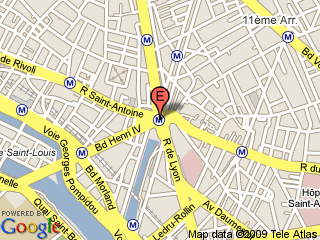
My exploration with JavaFX has been very fruitful. It is really easy to pick up and to be productive with it in a matter of hours. When I started to learn how Google Maps can be used with JavaFX, I found very little useful information in the Web. Googling the keywords "JavaFX Google Maps" was less than satisfactory. Then, I stumbled upon Google Maps can be used statically without Javascript. For example, the following map on Eiffel Tower is displayed using a static html link. Notice the latitude and longitude are specified in the URL.
http://maps.google.com/staticmap?center=48.8531,2.3691&markers=48.8531,2.3691,rede&zoom=14&size=320x240

Paris Eiffel Tower
It then dawned upon me how easy it is to incorporate Google Maps into JavaFX, all we need are the JavaFX Image and ImageView objects. For instance, the following codes will display the above map in a JavaFX application.
def stage = Stage {
title : "JavaFX Google Maps Demonstration"
scene: Scene {
 width: 500
 height: 400
 content: [
   ImageView {
     image: Image {
       url: "http://maps.google.com/staticmap?center=48.8531,2.3691&markers=48.8531,2.3691,rede&zoom=12&size=320x240"
     }
   }
 ]
}
}
Next, I discovered the use of Google Geocoding web service. Given an address, you can get the latitude and longitude of that address. For example, to find the latitude and longitude of New York USA, enter the following url.
http://maps.google.com/maps/geo?q=NEW+YORK+USA&output=xml
The Google Geocoding web service will return the following XML. Notice the latitude and longitude of New York, USA are returned in the coordinates element in line 25.
  
    NEW YORK USA
    
      200
      geocode


New York, NY, USA
US USA NY New York -73.9869510,40.7560540,0

Hence, using static Google Maps and GeoCoding web service, I ventured to develop this demonstration application using the latest JavaFX 1.2. A screen shot of the application is given here.


This simple application allows the user to enter an address. If Google recognises it, the map of the address will be shown. The user can also pan the map by dragging the mouse or zoom in and out of the map using the slider. The application comprises three files Main.fx, GMapUtils.fx and GmapGeoCoding.fx.

Click on the Launch button to try the application.


The full source codes of these three files are given as follows.
// Main.fx
package jfxgm;

import javafx.stage.Stage;
import javafx.scene.Scene;
import javafx.scene.Cursor;
import javafx.scene.image.ImageView;
import javafx.scene.image.Image;
import javafx.scene.input.MouseEvent;
import javafx.scene.control.TextBox;
import javafx.scene.control.Label;
import javafx.scene.control.Button;
import javafx.scene.control.Slider;

var lng:Number = 103.8476410;
var lat:Number = 1.3717300;
var zoom:Integer = bind javafx.util.Math.round(sZoom.value);

bound function getMapImage(lt, lg, zm):Image {
  var mapurl:String = "http://maps.google.com/staticmap?center={lt},{lg}&markers={lt},{lg},reda&zoom={zm}&size=480x320";
  var map:Image = Image {
    url: mapurl;
  }
return map;
}

function setLatLng(lt:Number, lg:Number):Void {
  lat = lt;
  lng = lg;
}

var mapview:ImageView = ImageView {
  layoutX:10 layoutY:75;
  image: bind getMapImage(lat, lng, zoom);
  cursor : Cursor.MOVE;
  var anchorx:Number;
  var anchory:Number;
  onMousePressed: function( e: MouseEvent ):Void {
    anchorx = e.x;
    anchory = e.y;
  }
  onMouseReleased: function( e: MouseEvent ):Void {
    var diffx = anchorx - e.x;
    var diffy = anchory - e.y;
    lat = GMapUtils.adjustLatByPixels(lat, diffy, zoom);
    lng = GMapUtils.adjustLngByPixels(lng, diffx, zoom);
  }
}

def lblAddress = Label {
  layoutX:10 layoutY:15;
  text: "Address :"
}

def txtAddress = TextBox {
  layoutX:70 layoutY:10;
  text: ""
  columns: 28
  selectOnFocus: true
}

def lblLat = Label {
layoutX:39 layoutY:45;
text: "Lat :"
}
def txtLatitude = TextBox {
layoutX:70 layoutY:40;
text: bind (lat.toString());
columns: 8
editable: false;
}
def lblLng = Label {
layoutX:175 layoutY:45;
text: "Lng :"
}
def txtLongitude = TextBox {
layoutX:210 layoutY:40;
text: bind (lng.toString());
columns: 8
editable: false;
}

def btnUpdateMap = Button {
layoutX:320 layoutY:10;
text: "Get Latitude and Longitude"
action: function() {
  var addr:String = txtAddress.text;
  GMapGeoCoding.getLatLng(addr, setLatLng);
}
}

def lblLevel = Label {
layoutX:310 layoutY:45;
text: "Level :"
}

def sZoom:Slider = Slider {
layoutX:355 layoutY:45;
min: 1
max: 20
value:15
vertical: false
}

def stage = Stage {
title : "JavaFX Google Maps Demonstration"
scene: Scene {
  width: 500
  height: 400
  content: [
    lblAddress, txtAddress,
    lblLat, txtLatitude,
    lblLng, txtLongitude,
    btnUpdateMap,
    lblLevel,sZoom,
    mapview,
  ]
}
}
// GMapUtils.fx
package jfxgm;

import javafx.util.Math.*;

def GMAPOFFSET = 268435456;
def RADIUS = GMAPOFFSET / PI;
def GMAPMAXZOOM = 21;

function lng2x(lng):Integer {
  return round(GMAPOFFSET + RADIUS * lng * PI / 180);      
}

function lat2y(lat) {
return round(GMAPOFFSET -
               RADIUS *
               log((1 + sin(lat * PI / 180)) /
               (1 - sin(lat * PI / 180))) / 2);
}

function x2Lng(x:Number):Number {
return ((round(x) - GMAPOFFSET) / RADIUS) * 180/ PI;
}

function y2Lat(y:Number) {
return (PI / 2 - 2 * atan(exp((round(y) - GMAPOFFSET) / RADIUS))) * 180 / PI;
}

public function adjustLngByPixels(lng:Number, delta:Number, zoom:Number):Number {
return x2Lng(lng2x(lng) + (delta * pow(2, (GMAPMAXZOOM - zoom))));
}

public function adjustLatByPixels(lat:Number, delta:Number, zoom:Number):Number {
return y2Lat(lat2y(lat) + (delta * pow(2, (GMAPMAXZOOM - zoom))));
}
// GMapGeoCoding.fx
package jfxgm;

import javafx.io.http.*;
import javafx.data.pull.PullParser;
import javafx.data.pull.Event;
import javafx.io.http.URLConverter;

public function getLatLng(address:String, setLatLng:function(lat:Number, lng:Number)):Void {
  def getRequest: HttpRequest = HttpRequest {
    var addr = URLConverter{}.encodeString(address);
    location: "http://maps.google.com/maps/geo?q={addr}&output=xml";
    onInput: function(is: java.io.InputStream) {
    def parser = PullParser {
      documentType: PullParser.XML;
      input: is;
      onEvent: function(event: Event) {
        if (event.type == PullParser.END_ELEMENT) {
          if (event.qname.name == "code" and event.text == "602") {
            setLatLng(0.0, 0.0);
          }
          else if (event.qname.name == "coordinates") {
            var pts = event.text.split(",");
            setLatLng(java.lang.Float.parseFloat(pts[1]),
                      java.lang.Float.parseFloat(pts[0]));
          }
        }
      }
    }
    parser.parse();
    parser.input.close();
  }
}
getRequest.start();
}

Java Compile and Run in Notepad++

Notepad++ is an excellent text editor. It supports syntax highlighting of many programming languages besides Java. Unlike Eclipse and Netbeans, it is light-weight and it can be launched from Windows Explorer easily by right-clicking on the file you wish to edit.

The following steps describe how you can extend the capabilities of Notepad++ to include compiling and executing Java programs from Notepad++ itself.

First, create a file called JavaCompileRun.bat. You can do this by right-clicking on your Windows' Desktop and then click New and Text Document. Then, key in "JavaCompileRun.bat" as the new file name. Right-click on this file and click Edit. Put in the following codes and save the file.
cd /d "%1"
javac %2
if errorlevel 1 goto finish
java %3
:finish
pause
Next, copy the file JavaCompileRun.bat to your Notepad++ program folder, usually at C:\Program Files\Notepad++.

Open Notepad++. Select the Run menu and click on Run.... A dialog box will appears. Key in the following command.
$(NPP_DIRECTORY)\JavaCompileRun.bat "$(CURRENT_DIRECTORY)" "$(FILE_NAME)" "$(NAME_PART)"
After keying in the above command, the dialog box should look something like this...


Click on the Save... button. In the Name: text box, key in "Java Compile and Save" as shown in the figure below.


Click OK and then click on the Run! button. Your Java program should compile and run if there is no error.

Now to compile the current Java program, make sure you have saved the file. Then, in the Run menu, click Java Compile and Run as shown.


A Command Prompt window will appear and the results of your Java program will be displayed.


There is however one serious limitation with this method. Only Java programs with default package will compile and run.

App_Code Folder in ASP .NET 3.5

In Visual Studio Professional 2008, you can still create the App_Code folder by right-clicking on the Web Project and selecting Add, then Add Folder. Rename the new folder to App_Code.

Contrary to some recommendations on the Web that you should not use the App_Code folder because you cannot place common Web UI codes or classes in this folder, you can do so by setting Build Action of each class to Compile. Suppose this step is not done, the classes defined in this folder will not be visible to your other codes. This explains why people recommended against the use of App_Code folder in VS 2008.

Suppose you have a class called WebCommon.cs in this folder. All you have to do is to right-click on this file and select Properties. A properties window will appear. Set Build Action to Compile. Viola! The class can be accessed exactly like what you have seen in VS 2005.

Using IronPython in ASP .NET VS 2008

Download Microsoft ASP.NET Futures (July 2007) from Microsoft and follow the instructions for installation closely in the download page especially you are installing it on Windows Vista.

The installation should work for Visual Studio 2005, Visual Web Developer 2005 Express Edition, Visual Studio 2008 or Visual Web Developer 2008 Express Edition. Start up Visual Studio, create a new website. You should see IronPython in the Language drop down box.

Storing Passwords in MS SQL

In MySQL, storing users' passwords is easily done by the function SHA1. Assuming a table usertable exists with two columns userid and passwrd.
INSERT INTO usertable(userid, passwrd) 
VALUES('johnlim', SHA1('SECRET'));

To retrieve the user's record,
SELECT * FROM usertable
 WHERE userid = 'johnlim'
   AND passwrd = SHA1('SECRET');

Is there an equivalent in MS SQL Server? Yes! Recently, MS SQL Server 2005 has nicely built-in support for hashing and the function is called HASHBYTES. This function takes in two string parameters. The first determines the algorithm used to provide the hash. Possible values for the algorithm are MD2, MD4, MD5, SHA and SHA1. The second takes in the value to be hashed.

Hence the equivalent SQL statements for MS SQL are
INSERT INTO usertable(userid, passwrd) 
VALUES('johnlim', HASHBYTES('SHA1', 'SECRET'));

SELECT * FROM usertable
 WHERE userid = 'johnlim'
   AND passwrd = HASHBYTES('SHA1', 'SECRET');

The only difference is that the passwrd column in MySQL is VARCHAR while in MS SQL is VARBINARY.

Changing Template in Blogger

I had been a casual blogger until of late when I am seriously exploring how Blogger works. One of the things which I sought to do was to change the template to something more professional. I have tried many templates without success. The cryptic errors reported by Blogger on various occasions were bX-si9ejx, bX-aoj9qb, bX-hq2u5m and etc.

Many other bloggers also experienced these problems and the solution commonly suggested was to delete all browser cookies and temporary files, and then upload the template again. This solution didn't work for me. I also tried changing browsers from FireFox to IE to Chrome and even Opera.

After many hours of research and experimentation, I've finally understood the problem. I came to the understanding that the template not only defines the skin and the layout of the blog, it also stores information about the widgets which I've created. The definition for each created widget is stored in this template. And along with this definition, Blogger also automatically assigns an id with each created widget. By the way, for the uninitiated, widgets are page elements which make up a blog. These are your blog archives, labels, feeds, links and etc. Basically, they are different sections of your blog.

For each template downloaded from popular sites such as Our BLOGGER Template, the template also consists of pre-defined widgets . As mentioned above, each widget is defined by its id. Most of the time unfortunately, the ids of these widgets clash with your existing widgets. In another words, they have the same name. This is where the problem lies!

To overcome this problem, before you upload the template, you should resolve these name conflicts. Common names of widgets are blog1, feed1, label1, etc. You probably need to rename all these other names, (such as blog111, feed111 and label111 etc) in order to avoid the problem altogether.

Take for example the Professional Template downloaded from http://www.ourblogtemplates.com/2008/11/blogger-template-professional-template.html.
These are the lines in the template which should be changed. You can open this file using WordPad and search for "widget id". You need not rename every instance. Only those instances that have name conflicts with your existing widgets need to be renamed. But for simplicity, just rename every widget id.
<b:widget id='Header1' locked='true' title='The Professional Template (Header)' type='Header'>
<b:widget id='Blog1' locked='true' title='Blog Posts' type='Blog'>
<b:widget id='Profile1' locked='false' title='About Me' type='Profile'>
<b:widget id='Label2' locked='false' title='Labels' type='Label'>
<b:widget id='Image1' locked='false' title='' type='Image'>
<b:widget id='Text2' locked='false' title='About This Blog' type='Text'>
<b:widget id='Text3' locked='false' title='Lorem Ipsum' type='Text'>
<b:widget id='Text4' locked='false' title='Lorem Ipsum' type='Text'>
<b:widget id='Text5' locked='false' title='Lorem' type='Text'>
<b:widget id='LinkList1' locked='true' title='Linkbar' type='LinkList'>
<b:widget id='LinkList2' locked='false' title='Links' type='LinkList'>
<b:widget id='BlogArchive1' locked='false' title='Blog Archive' type='BlogArchive'>
<b:widget id='Feed1' locked='false' title='Our Blogger Templates' type='Feed'>
The following lines show the renamed ids. E.g. Header1 → Header111.
<b:widget id='Header111' locked='true' title='The Professional Template (Header)' type='Header'>
<b:widget id='Blog111' locked='true' title='Blog Posts' type='Blog'>
<b:widget id='Profile111' locked='false' title='About Me' type='Profile'>
<b:widget id='Label222' locked='false' title='Labels' type='Label'>
<b:widget id='Image111' locked='false' title='' type='Image'>
<b:widget id='Text222' locked='false' title='About This Blog' type='Text'>
<b:widget id='Text333' locked='false' title='Lorem Ipsum' type='Text'>
<b:widget id='Text444' locked='false' title='Lorem Ipsum' type='Text'>
<b:widget id='Text555' locked='false' title='Lorem' type='Text'>
<b:widget id='LinkList111' locked='true' title='Linkbar' type='LinkList'>
<b:widget id='LinkList222' locked='false' title='Links' type='LinkList'>
<b:widget id='BlogArchive111' locked='false' title='Blog Archive' type='BlogArchive'>
<b:widget id='Feed111' locked='false' title='Our Blogger Templates' type='Feed'>
Have a productive time changing your blogger templates!

Dim Sum Trolley

A warm welcome to our dim sum trolley!

Here we hope to share with you choice pickings from our travels near and far. It is our humble wish that these bite-sized nuggets tantalize, inspire, delight or stoke a sense of wonder in the reader.


A post-script for our non-Chinese visitors who may wonder about "dim sum", these Chinese words are transliterated as "a little heart" or "touch the heart". Dim sum are the favourite snacks of many Chinese, especially Cantonese, coming in all shapes and form, weird and wonderful. We like the Chinese words used for this array of delicious snacks -- a little heart. After all, more than food, it's about heart.